 The question “How do I get a domain name?” is one that is asked by all newbies. Certainly you can jump straight into registering Internet domain names but it is a much better idea to do a little homework first, as outlined in the simple steps below, so that the domain name that you choose is one that will enhance your chances of getting people to your site.
At first, it might seem a little daunting with respect to how to register a domain name yourself. But it really is quite straight forward and once you have registered one, you will find the process really easy from then on.
To purchase a domain name, you simply have to find a domain name that is still available and then register it. The process is very straightforward and can be broken down into 4 easy steps:
Step 1: Make a List of Possible Domain Names
What you need to do first is to think of a suitable domain name that you would like to use for your website and one that is still available.

What type of site do you have in mind? Will it be informational only? Are you creating a site for a sporting organization or a hobby site for yourself? Are you hoping to monetize your site? Do you already have a product in mind or an eBook that you have already created and wish to sell? Most importantly, what exactly is your site about?
Generally speaking it is best not to use your name in your domain name unless your name is already a “brand name” or readily recognized by a wide audience. There may come a day when you have a few sites and you want to sell this one. If the domain name is your own name it will have limited use and appeal to new owners.
It is a good idea to look for words that suggest what your site is about so that people instantly get the idea of what your site has to offer. Opt for a spelling that is easy to remember.
Updated 8th Oct 2012: But avoid exact match domains (EMD) as a Google update earlier this month saw many thin, EMD sites lose top rankings.
Best Domain Names – What can People Remember?
You can incorporate a search term your visitors might use to find your site but avoid, as mentioned in the update above, an exact match domain name.
There are a number of tools you can use to check search terms (keywords) but the tools I use the most are Long Tail Pro and Google’s Keyword Tool
The Google Keyword Tool
Using this tool, you can enter words or phrases that you think someone might use to find your site and find out how many people are using those particular phrases in their searches.
For example if your site is going to feature your own photography, then you could enter some related terms to see if they are being used in searches. Perhaps you want to share your knowledge as a photographer and offer tips to people who aspire to improve their skills. You would enter the relevant search phrase into the Keyword Tool, “photography tips” for example, to find out how many people searched on that term last month and the extent of competition for that search term (that is, how many other sites have been optimized for that search term as well.)
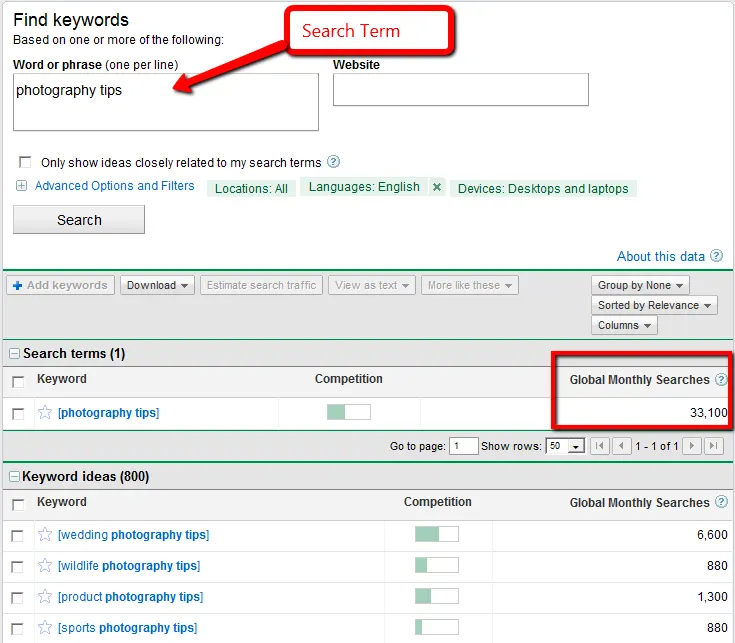
Google Search Tool
But if this is too narrow then you would target a broader description. If you are hoping to advertise your services as a photographer, for example, then you could enter a more relevant phrase such as “top photographer”. This exercise of checking on what people are actually searching for in the search engines can help you to come up with a list of possible domain names for your site that might help your site rank more highly in the search engine results.
Should it be a .com or .net or some other kind of extension?
If your site will be for a global audience, then ALWAYS go for a .com if it is available; you will find that most people automatically assume .com when you tell them the name of your site so you won’t have to correct them if you have chosen .net instead for example.
If your site is advertising services in a local area or a specific country then you can choose the relevant local extension such as .com.au in the case of Australia for example. Keep in mind that .com and .net will usually be cheaper and that there may be additional information needed for various country code extensions. For example, in Australia, an Australian Business Number (ABN) is needed for a .com.au domain. Generally speaking, .com is much more straightforward, more universal and has wider appeal for sites targeting a global market.
Step 2: Filter Your List of Possible Domain Names
Now that you have a list of available domain names, do a final check to narrow your selection:
- Descriptive – Is it easy to tell what the site is about by just reading the name?
- Distinctive – Does it sound distinctive or too similar to other established sites? That is, you don’t want it easily confused with another popular site that could end up with your traffic.
- Easy to Remember – It’s a good idea to choose a name that is easy to remember and without alternative spellings.
- Easy to Say – Will people be able to easily pass on the word about your new site?
- No Breaks – Choose names that are not hyphenated.
- Low Competition – Check the competition. If you end up choosing a domain name that does have keywords in it then check the 1st page of search engine results using that keyword. Are there any large named companies dominating positions 1 to 3 or, worse still, positions 1 to 10?
Some people prefer to buy existing domain names; that is, domain names that have been in use and just expired or domain names that the owner is willing to sell. The intention here is to “snap up” a very good keyword-targeted domain name and/or buy a domain name that already has ranking in the search engines. This is certainly one way you can go if you like but it is usually considerably more expensive and probably of more appeal further down the track once you are used to the process of finding a domain name.
Step 3: Check Domain Name Availability
The name that you choose has to be unique and one that hasn’t already been registered. For example, the domain name brightdogtips.com has already been taken so no-one else can use that name for their website unless it is sold on or allowed to expire.
How to check domain availability is quite straight forward . Domain registrars and most hosting companies allow you to check availability of domain names on their sites. The following domain name search engine is one that I have used extensively and will provide the tool you need for your domain name search.
Check Availability of Domain Name ….
Enter each name on your filtered list to see which domain names are available (not already registered by someone else). Then make your preferred selection from those still available.
Now that you have made your choice you are ready for the next step.
Step 4: Register Your Preferred Domain Name
Buying a domain name, or more accurately, registering it, is a very simple process. To “buy” a domain name, you simply have to register it for the advertised fee.
Once you have found an available name that you like, you need to register it for either a monthly fee or a yearly fee. I always go for the term of a year or two as it is cheaper and a job that I now need to think about only once every year or so.
So, how do you go about domain registering once you have settled on your preferred choice? Again it is very straightforward. For example, if you use the domain availability check above, then once you enter a name and get the confirmation on the screen that it is indeed available, you will see an option to add it to your cart. From that screen, the registrar will give very clear directions from that point on so that you can pay for the period of time you elect.
There are many domain name registration services. After much research, I decided that the best place to register a domain name, for me, was Go Daddy and have been very happy with my choice. I receive an email with plenty of notice each time that my domain name is nearing a renewal date. I have mine set up with automatic renewals but I still receive the email with advice as well which allows me to make sure that my payment details are up-to-date.
So in summary the easy steps to follow are:
- Make a list of possible domain names.
- Filter Your List of Possible Domain Names.
- Check Domain Name Availability.
- Register Your Preferred Domain Name.
So, as you can see, domain name registration is quite straight forward. Anytime you want to register domain names, you can just follow this 4 step process and it is done in a matter of minutes.
What is the Next Step After Registering Your Domain Name?
Now you are the proud owner of your very own domain name. An exciting journey lies before you as you develop your online website. Once you have your domain name, there is no urgency to do anything with it until you site is ready to “go live”. You now own your chosen domain name so you can take the time you need to find your preferred host and create your site the way you would like it.
You will find that Go Daddy often have specials for cheap domain names. I have found their emailed alerts (when it’s time for domain name registration renewal) to be very useful and informative, always letting me know of specials etc. Have fun with your domain name search; now you will be able to have your own piece of Internet real estate and be able to proudly display it as part of your email signature.

Leave a Comment